
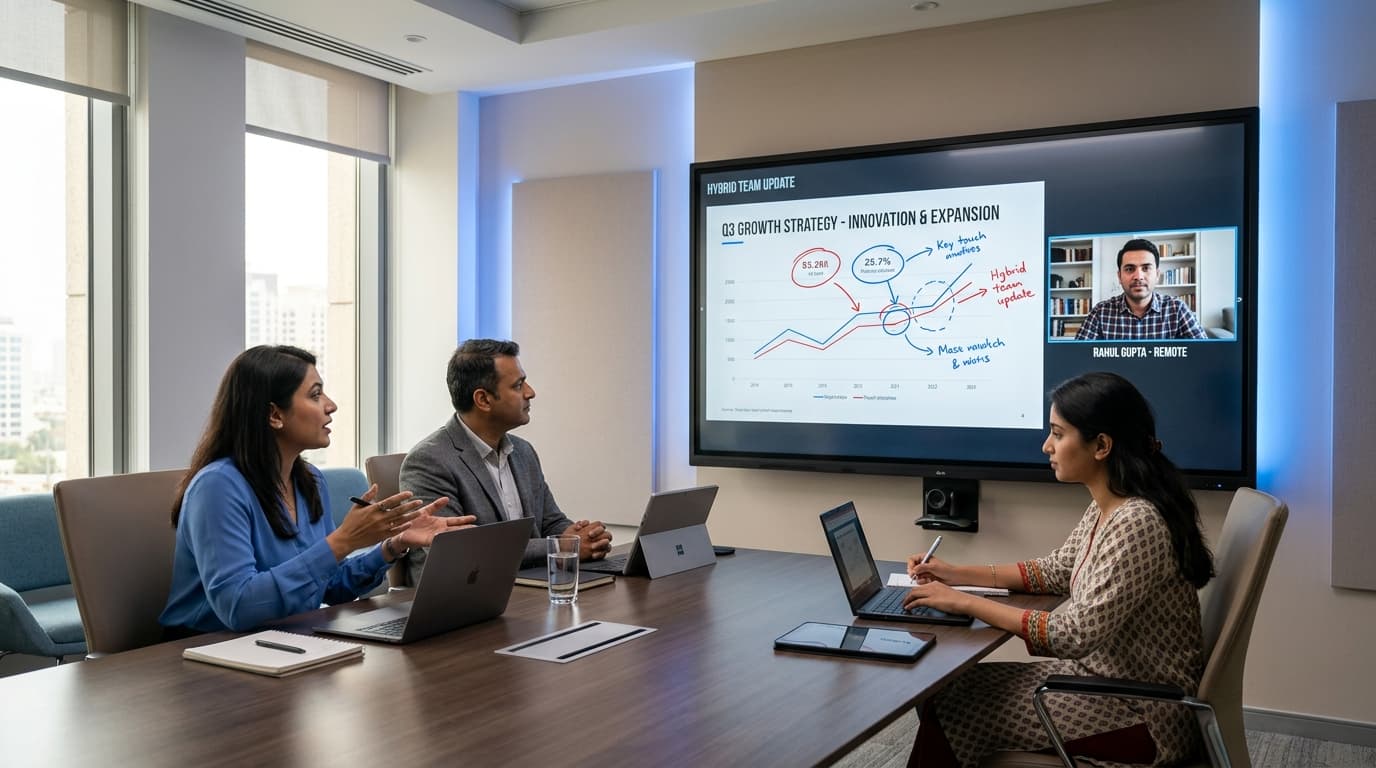
What Makes a Great Interactive Flat Panel for Hybrid Work? A No-Nonsense Buyer's Guide (2026)
Written by Milap Mehta, EdTech Specialist at Nitek IFP
Milap Mehta
Official Blog Contributor
Hybrid work is no longer an experiment. Across Indian offices, schools, and institutions, teams are now split between in-room and remote participants on a daily basis. The challenge? Making sure both sides of that call can see, hear, and collaborate equally well.
The interactive flat panel (IFP) sitting in your conference room or boardroom is now the centrepiece of that experience. Get it right and hybrid meetings run smoothly. Get it wrong and you have frustrated teams, dropped connections, and wasted investment.
If you are evaluating an interactive flat panel for hybrid work in India, this guide cuts through the marketing noise and tells you exactly what to look for, what to skip, and what Nitek brings to the table.
What Is an Interactive Flat Panel and Why Does It Matter for Hybrid Work?
An interactive flat panel is a large-format touch display, typically ranging from 55 inches to 98 inches, that combines a 4K screen, built-in computer, touch annotation, video conferencing tools, and collaborative software in a single device.
For hybrid work specifically, an IFP does three things that older displays cannot: it brings remote participants into the room at full scale, it lets in-room participants annotate and collaborate in real time, and it runs the apps your team already uses without needing a separate PC.
The difference between a basic commercial display and a purpose-built IFP for hybrid work is significant, and this guide will help you understand exactly where that gap lies.
The 6 Features That Define a Great Interactive Flat Panel for Hybrid Work
1. Display Quality: Why 4K Is Non-Negotiable in 2026
The first thing that separates a good hybrid work display from a great one is resolution.
A 4K UHD display (3840 x 2160 pixels) delivers four times the clarity of a standard 1080p screen. In a conference room or boardroom, this matters more than people realise. When you are presenting a spreadsheet, sharing a product roadmap, or annotating a technical diagram, participants at the back of the room need to read every detail clearly.
On a 75-inch or 86-inch interactive flat panel, the difference between 4K and 1080p is immediately visible. Text looks sharper, colour gradients are smoother, and video calls look more lifelike.
Nitek interactive flat panels run on 4K UHD displays across all screen sizes: 55 inch, 65 inch, 75 inch, 86 inch, and 98 inch. This ensures that whether you are in a small huddle room or a large boardroom, visual clarity is never a compromise.
2. Operating System: Android 16 Is the New Standard
The operating system running inside your IFP determines how fast it performs, which apps it supports, and how long the device stays relevant.
Many IFPs in the Indian market still run on older Android versions: Android 9 or Android 11. These devices are already falling behind in app compatibility and security updates.
Android 16, which Nitek runs on its panels, brings:
• Faster app loading and smoother multitasking
• Full compatibility with Microsoft Teams, Google Meet, Zoom, and other leading collaboration platforms
• Better security patches and longer software support
• Improved energy efficiency
If you are investing in an interactive flat panel for a corporate boardroom or a hybrid-ready meeting room, the OS version is not a minor spec. It is the backbone of your entire workflow.
3. AI Tools: The Features That Actually Change Hybrid Meetings
This is where modern IFPs genuinely separate themselves from older display technology. The right AI tools can transform the quality of your hybrid meetings.
Auto-Framing: The camera automatically tracks and frames active speakers in the room, so remote participants always see a well-composed, centred view rather than a wide shot of an empty table. This is one of the most impactful features for hybrid work.
Voice Tracking: The microphone array identifies which direction sound is coming from and adjusts audio pickup accordingly. Remote participants hear the speaker clearly, not a mix of room echo and background noise.
Real-Time Annotation: Participants can write, draw, highlight, and annotate directly on the screen during a live presentation or call. These annotations can be saved and shared instantly, removing the need for follow-up photos of whiteboards.
Nitek interactive flat panels include all three of these AI tools as standard features, not as paid add-ons. For organisations running frequent hybrid meetings, these capabilities have a direct impact on meeting quality and team productivity.
4. Screen Size: Matching the Panel to the Room
Choosing the wrong screen size is one of the most common mistakes in corporate display procurement. A 55-inch panel in a 20-person boardroom is simply not visible from the back of the room.
Here is a practical size guide for hybrid work environments:
|
Room Type |
Recommended Size |
|
Huddle room (2-4 people) |
55 inch or 65 inch |
|
Medium conference room (6-10 people) |
75 inch |
|
Large boardroom (12-20 people) |
86 inch |
|
Auditorium or large training room |
98 inch |
Nitek offers interactive flat panels in all five sizes, so you can deploy the right panel for each space in your organisation without switching brands or ecosystems.
5. Connectivity and Compatibility
A hybrid work display is only as useful as the number of devices and platforms it connects to seamlessly. Look for IFPs that support:
• HDMI 2.0 and USB-C for laptop connections
• Wireless screen sharing (Miracast, AirPlay) so participants can share without cables
• Native support for Teams, Zoom, and Google Meet without additional hardware
• Multiple USB ports for peripherals like webcams and keyboards
Avoid panels that require a proprietary dongle or a separate PC to run your video conferencing software. These add cost, complexity, and potential failure points in your setup.
6. Warranty and After-Sales Support in India
This is a factor that Indian buyers often underweight during evaluation, and then regret after purchase.
Interactive flat panels are long-term investments. A 75-inch 4K IFP sits in a boardroom for 5 to 7 years. During that time, you want a manufacturer who answers the phone, sends a technician promptly, and honours their warranty without a lengthy claims process.
Many global IFP brands operating in India offer only a 1-year warranty with limited local service infrastructure. Nitek offers a 3-year warranty with dedicated support for Indian customers. That is a meaningful difference in total cost of ownership.
Interactive Flat Panel vs Traditional Video Conferencing Setup: Which Is Better for Hybrid Work?
This is a question many procurement teams ask before choosing between a dedicated IFP and a traditional setup involving a separate display, webcam, speakerphone, and PC.
The comparison largely favours the IFP for organisations running frequent hybrid sessions:
|
Factor |
Traditional Setup |
Interactive Flat Panel |
|
Setup time per meeting |
5-10 minutes |
Under 1 minute |
|
Touch and annotation |
No |
Yes |
|
AI auto-framing and voice tracking |
Requires separate hardware |
Built-in |
|
Long-term reliability |
Multiple failure points |
Single integrated device |
|
Cost over 5 years |
High (multiple device replacements) |
Lower (single investment) |
|
Content sharing |
Cable-dependent |
Wireless and wired |
For organisations where meetings happen daily and hybrid collaboration is part of the workflow, an IFP delivers better ROI, better meeting experience, and lower long-term complexity.
What to Check Before You Buy: A Quick Evaluation Checklist
Before finalising any interactive flat panel for hybrid work in India, run through these questions:
• Does it support Android 14 or Android 16? (Avoid anything older)
• Is the resolution 4K UHD? (Do not accept Full HD for displays above 65 inches)
• Does it include auto-framing and voice tracking built in?
• What is the warranty period, and is local service available in your city?
• Does it support your preferred video conferencing platform natively?
• What screen size is appropriate for your room dimensions?
• Does the manufacturer have documented deployments in Indian institutions?
Nitek ticks every box on this list. Their panels run on Android 16, deliver 4K across all sizes, include AI tools as standard, carry a 3-year warranty, and are trusted by 100+ institutions across India.
Why Indian Organisations Are Choosing Nitek for Hybrid Work
Nitek is an Indian IFP manufacturer that has been building interactive flat panels specifically for Indian use cases since 2018. That context matters because the challenges faced by an IT head in a Pune corporate office or a Mumbai boardroom are different from those in European or North American markets.
Nitek panels are designed for:
• Indian power conditions and voltage stability
• Local technical support without international escalation queues
• Android 16 compatibility with both international platforms (Teams, Zoom) and India-centric tools
• Competitive pricing relative to imported brands with comparable specs
More than 100 schools, colleges, and corporations across India have deployed Nitek panels. That track record is a meaningful indicator of reliability and service quality for new buyers.
Choosing the right interactive flat panel for hybrid work is a decision that shapes how your team collaborates for years to come. The key criteria are clear: 4K display quality, a modern OS like Android 16, built-in AI tools such as auto-framing and voice tracking, the right screen size for your room, and reliable warranty support from a manufacturer who operates in India.
Nitek delivers all of these in a single device, at a price point that makes 4K hybrid collaboration accessible to Indian organisations of all sizes.
|
Ready to upgrade your conference room or boardroom? Explore Nitek's range of interactive flat panels, request a demo, or contact their team for a customised quote. |
Frequently Asked Questions
Q1: What is the best interactive flat panel for hybrid work in India?
The best interactive flat panel for hybrid work in India should offer a 4K display, Android 14 or 16, built-in AI tools like auto-framing and voice tracking, and native support for video conferencing platforms like Zoom and Teams. Nitek's IFP range meets all of these criteria and is backed by a 3-year warranty.
Q2: What size interactive flat panel is best for a conference room?
For a medium-sized conference room with 6 to 10 participants, a 75-inch interactive flat panel is the most recommended size. Smaller huddle rooms work well with a 55-inch or 65-inch panel, while large boardrooms benefit from 86-inch or 98-inch displays.
Q3: Do interactive flat panels work with Microsoft Teams and Zoom?
Yes. Modern interactive flat panels running Android 14 or Android 16 are compatible with Microsoft Teams, Zoom, Google Meet, and most other major video conferencing platforms. Nitek panels running Android 14 support all leading platforms natively.
Q4: What is the difference between a 4K interactive flat panel and a standard display?
A 4K interactive flat panel combines a high-resolution 3840 x 2160 display with touch input, annotation tools, a built-in computer, and AI features like auto-framing. A standard commercial display only outputs video and has no interactive or computing capabilities.
Q5: How long do interactive flat panels last, and what warranty should I expect?
A quality interactive flat panel typically lasts 5 to 7 years with regular use. When buying in India, look for a minimum 2-year warranty, though Nitek offers a 3-year warranty which is above the market average and provides better long-term protection for your investment.