
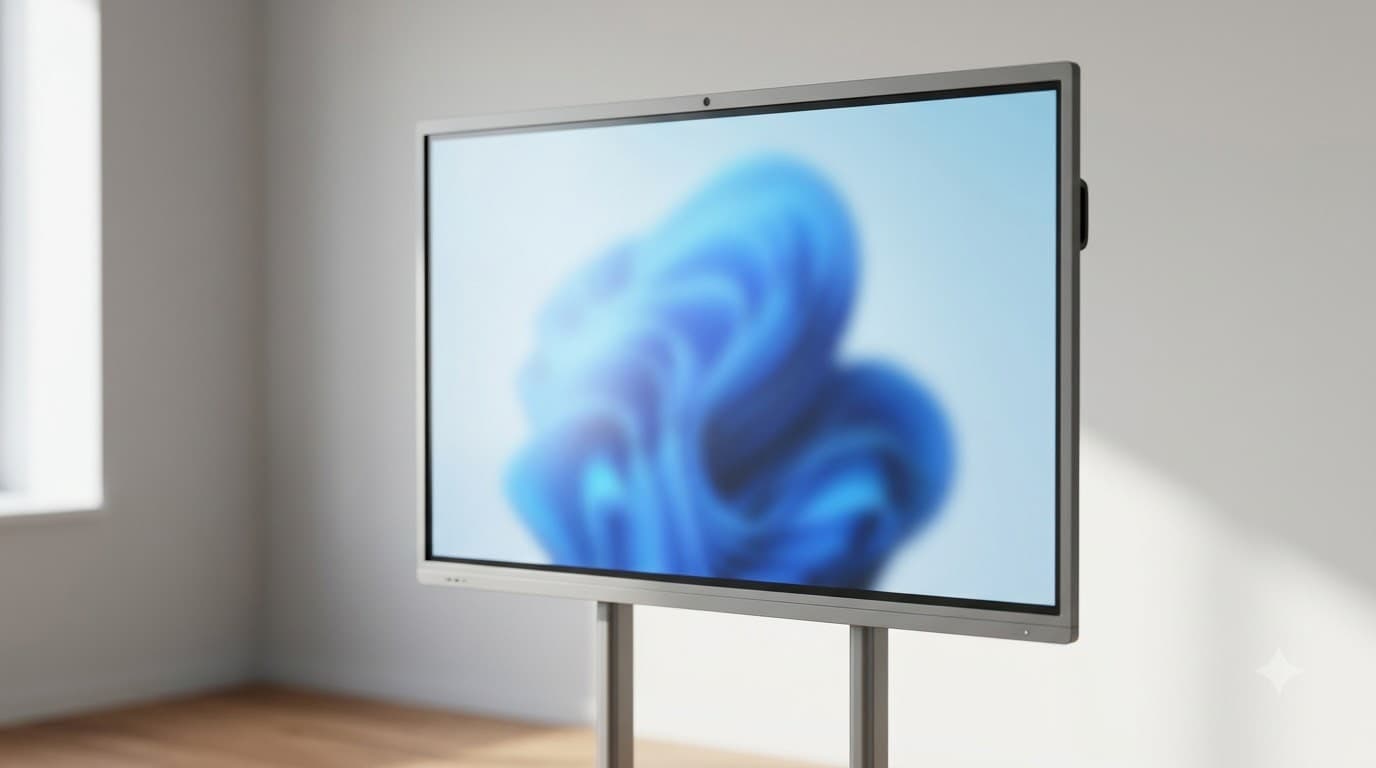
Interactive Flat Panel in India: The Complete Guide (2026)
Written by Milap Mehta, EdTech Specialist at Nitek IFP
Milap Mehta
Official Blog Contributor
Interactive Flat Panel in India: The Complete Guide (2026)
|
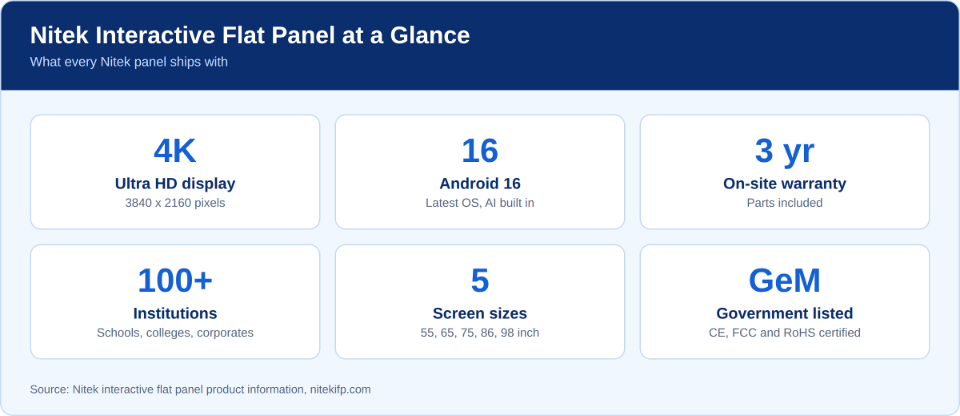
QUICK ANSWER Walk into most Indian classrooms and you will find a chalk board, a projector with a tired lamp, or a smart TV nobody knows how to use. An interactive flat panel (IFP) replaces all three with one 4K touchscreen you can write on, present from and teach with. This guide shows you how to choose the best interactive flat panel in India: what it is, which size fits, what it costs, which AI tools matter and what to check in the warranty. It uses Nitek, a Gujarat-based maker trusted by 100+ institutions, as its reference point. Nitek panels run Android 16, ship with built-in AI tools and carry a 3-year on-site warranty. Its new AI Learning Ecosystem adds a fifth thing to compare on top of the usual four. The guide is written for principals, teachers, IT heads and procurement managers who want facts, not brochure language. Every section links to a deeper article, so read what you need and skip the rest. |
|
IN THIS GUIDE What an interactive flat panel is | How to compare brands | Sizes | Price | AI tools | The fifth dimension | Display, touch and connectivity | Warranty and service | Schools, colleges and institutes | Corporate use | Why Nitek | 5-step decision path | FAQs |
What Is an Interactive Flat Panel?
An interactive flat panel is a large touchscreen, usually 55 to 98 inches, that works as a whiteboard, a computer screen and a presentation display in one. You touch it, write on it and run apps on it. There is no projector to align, no marker to dry out and no chalk dust.
Most panels, including Nitek's, run Android and can add a full Windows computer through a slot called OPS. If those terms are new to you, start with our plain-language explainer for Indian schools.
Interactive Flat Panel vs Projector, Whiteboard and Smart TV
|
Feature |
Interactive flat panel |
Projector with whiteboard |
Smart TV |
|
Touch and writing |
Built in, directly on screen |
Needs a separate board or add-on |
Usually none |
|
Bright classrooms |
Bright 4K screen, no washed-out image |
Image can fade in daylight |
Bright screen |
|
Running costs |
No lamp to replace |
Lamp replacements over the years |
Low |
|
Classroom tools |
Whiteboarding, screen recording, lesson apps |
Depends on the laptop connected |
Mostly video and streaming apps |
|
Best for |
Daily teaching and training |
Tight budgets, occasional use |
Watching video, not teaching |
The price gap between these options shrinks fast once lamps and maintenance are counted. The numbers are in our 5-year projector vs IFP cost comparison and summarised further down.
How to Compare Interactive Flat Panel Brands in India
Buyers in India usually compare Nitek with Promethean, BenQ, ViewSonic, Samsung, LG, SMART, Maxhub, Sharp and StudynLearn. The brand name matters less than what is written in the quotation. Run every shortlisted panel through the same ten checks.
|
# |
Check |
What to look for |
|
1 |
Screen size |
Matches the depth of your room, not just your budget |
|
2 |
Resolution |
4K UHD, so text stays sharp from the last bench |
|
3 |
Touch points |
Ask for the count in writing and test it with two people writing at once |
|
4 |
Android version |
Android 13 or above, with Android 16 preferred |
|
5 |
OPS bay |
Present, so you can add a Windows computer later |
|
6 |
Warranty type |
On-site, not carry-in |
|
7 |
Warranty length and cover |
Duration in years, and whether parts are included |
|
8 |
Service network |
Engineers in your city or nearby, not just a helpline |
|
9 |
Teacher training |
Included in the quotation, not an optional extra |
|
10 |
After-warranty cover |
AMC terms and pricing stated upfront |
Want the long version with reasons behind each check? Read the 10-point buying checklist. For a side-by-side view of the market, see the top 10 interactive flat panels in India.
These checks cover the four factors buyers have always weighed: display, operating system, service and price. There is now a fifth, covered in the section on Nitek's AI Learning Ecosystem below.
|
Compare on the same page. If a quotation is silent on warranty type, OS version or training, treat the silence as a no until it is written down. |
Interactive Flat Panel Sizes: 55, 65, 75, 86 and 98 Inch
Size is the first decision and the one buyers most often get wrong. Too small and the back bench squints. Too big and you pay for screen the room cannot use. Nitek panels come in 55, 65, 75, 86 and 98 inch.
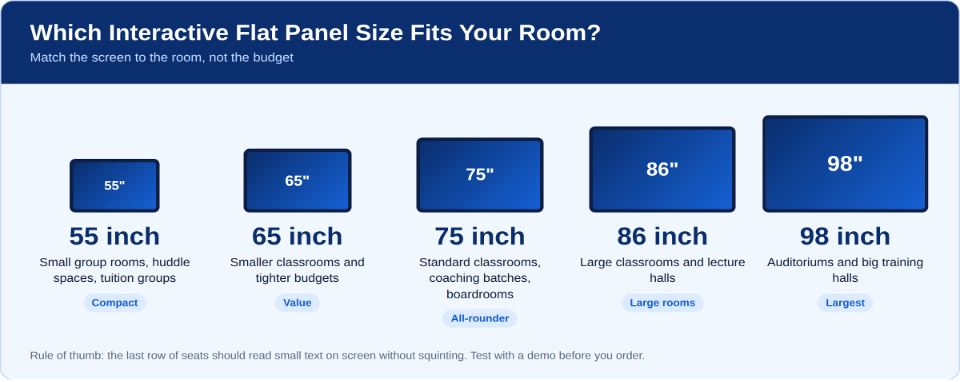
For a standard classroom or coaching batch, 75 inch is where most buyers land. See the best 75 inch interactive flat panels in India for the detail. Coaching centres weighing 55, 65 and 75 inch can use our size guide for coaching centres, and there is a full buying guide for coaching classes too.
Colleges with tiered lecture halls should look at 86 inch. Auditoriums and large training halls are 98 inch territory. Whatever you choose, ask for a demo in your own room. A panel that looks perfect in a showroom can feel very different from the last bench.
Interactive Flat Panel Price in India (2026)
Price depends on size, operating system, OPS module and warranty. Be careful with quotations that look cheap because they leave things out, such as the stand, installation or the Windows module.
Nitek's 75 inch panel costs roughly Rs 1,18,000 to Rs 1,65,200 including GST, depending on configuration. For the 55, 65, 86 and 98 inch models, ask Nitek for a current quote. Here is what a standard 75 inch setup adds on top:
|
Setup item |
Approximate cost (incl. GST) |
|
Basic wall mount |
Included free |
|
Floor stand with castors |
Rs 10,620 |
|
Professional installation |
Up to Rs 3,500 |
|
Voltage stabiliser |
Rs 3,540 to Rs 9,440 |
|
OPS Windows module (optional) |
Rs 31,860 |
|
Standard 75 inch setup, total |
Rs 1,25,600 to Rs 1,72,600 |
Prices are indicative and can change, so confirm them on the day you receive your quotation. The full breakdown is in our smart classroom setup cost guide. Also ask Nitek to spell out what the AI Learning Ecosystem includes in your quotation.
Why the Cheaper Option Costs More Over Five Years
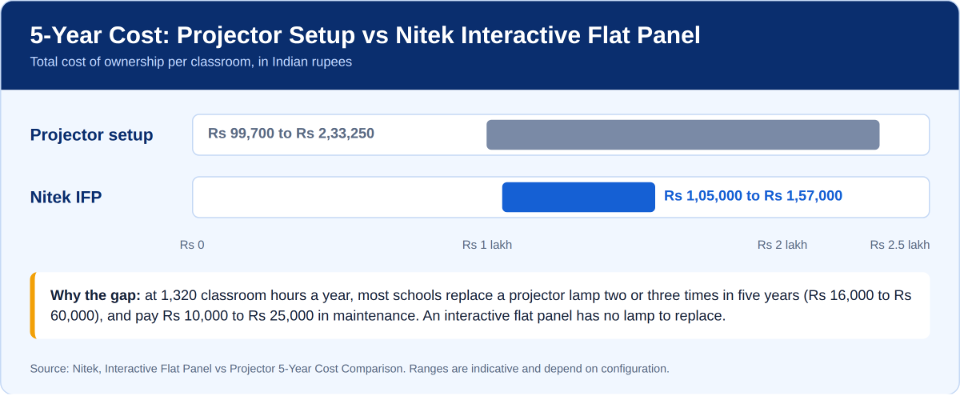
A projector setup looks cheaper on day one. Over five years of classroom use, most schools replace the lamp two or three times and pay for regular maintenance. An interactive flat panel has no lamp to replace.
Interactive Flat Panel with AI Tools: What to Look For
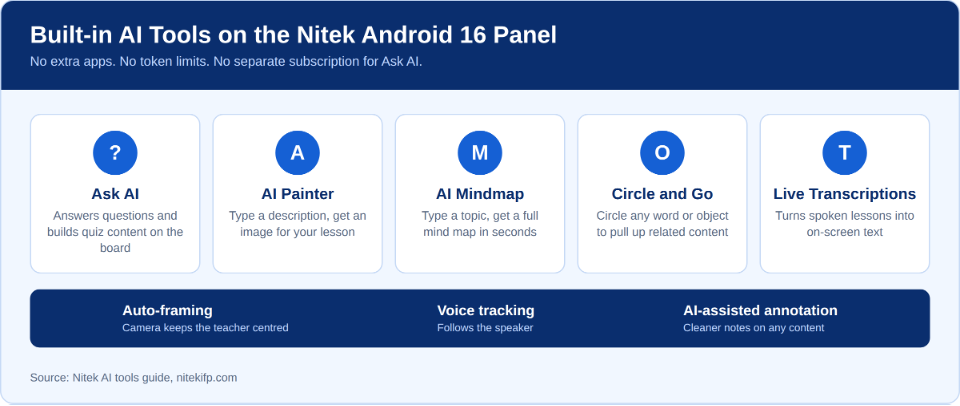
Every brand now says AI. Ask one question: does it work on the board itself, without extra apps or a separate subscription? Here are the tools Nitek's Android 16 panel includes.
When you compare AI features across brands, use this short filter:
• Native, not add-on. The tools should live inside the panel's interface, not in a third-party app.
• No token limits. Ask whether the AI stops working after a set number of queries.
• Both kinds of AI. Look for assistive tools (search, transcription) and generative tools (images, mind maps).
• A current OS. Android 16 is what makes these tools work natively. See Android 14 vs Android 16 for the difference.
Auto-framing keeps the teacher centred on camera during recordings, and voice tracking follows the speaker. Both help when lessons are recorded or streamed.
For a deeper look, read what AI tools an IFP should actually have, how Nitek's built-in AI tools work for teachers and Nitek's Android 16 AI features for Indian classrooms. If your school is planning for AI in the curriculum, this readiness guide is a good starting point.
The Fifth Dimension: Nitek's AI Learning Ecosystem
Until now, the best interactive flat panel question came down to four things: display resolution, operating system, service quality and price. With its September 2026 launch, Nitek has added a fifth: an AI Learning Ecosystem, a bundled AI-powered learning package delivered alongside the panel itself.
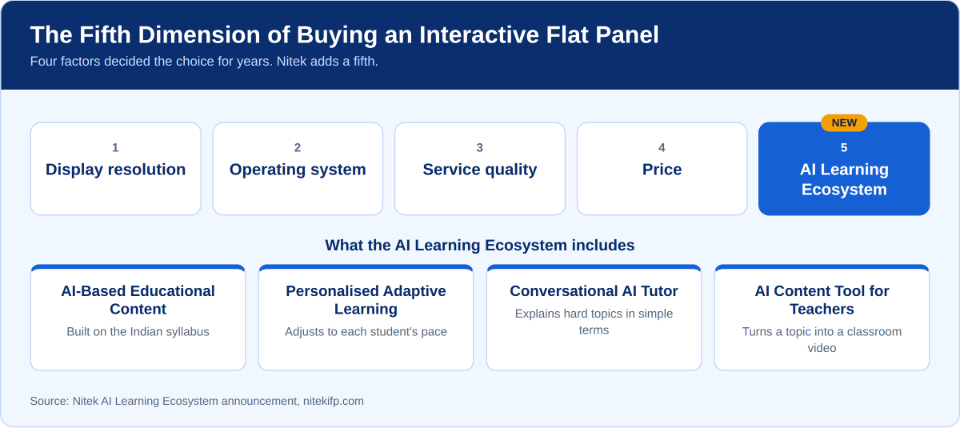
The on-board tools above help a teacher run a lesson. The ecosystem covers what gets taught and how students learn it. It has four parts.
AI-Based Educational Content, Built on the Indian Syllabus
Lessons are aligned to Indian syllabi and developed with experienced content creators and subject matter experts.
Personalised Adaptive Learning
The system adjusts to each student's pace and tracks performance against the content, so weak areas become visible.
A Conversational AI Tutor for Students
Students can ask questions and get explanations in the simplest possible terms, even on highly complex topics. The tutor adapts to what the student already knows. For example, it can explain a concept through cricket.
An AI Content Tool for Teachers
Teachers enter a topic or idea and the tool generates a complete classroom video, all inside Nitek's ecosystem with no external tools.
When you compare brands, ask every seller what arrives with the panel beyond the hardware. For the full announcement, read Nitek's AI Learning Ecosystem launch article.
Display, Touch and Connectivity: The Specs Worth Checking
• 4K UHD (3840 x 2160). Sharper text and diagrams, which matters most in large rooms.
• Touch response. Test it. Write fast, draw quickly and let two people work at the same time.
• OPS bay. Nitek includes it as standard. It lets you slot in a Windows computer and switch between Windows and Android. See how to run both on one panel.
• Ports and wireless. USB-C, HDMI and Wi-Fi decide how easily teachers connect laptops and phones. This connectivity guide explains each one.
Warranty, Service and Lifespan
Warranty terms tell you more about a brand than a spec sheet does. Nitek offers a 3-year on-site warranty with parts included, and service coverage across Gujarat, Maharashtra, Rajasthan, Karnataka and other states. Its distributor network also reaches Tier 2 and Tier 3 cities.
Whichever brand you pick, get three things in writing: that the warranty is on-site, the expected response time, and the AMC price for the years after warranty ends. The IFP warranty trap explains what goes wrong when buyers skip this.
Panels also last longer with basic care. This lifespan and maintenance guide covers wall mounts, cleaning and daily habits, and these five common problems teachers report can usually be fixed without a service call.
Best Interactive Flat Panel for Schools, Colleges and Educational Institutes
Private and Government Schools
Schools need durable panels that teachers of every comfort level can use. Government buyers also need procurement clarity, and Nitek is listed on the Government e-Marketplace (GeM). Read the complete guide to buying for Indian schools and what government school deployment looks like. For policy context, see how IFPs align with NEP 2020 and how Nitek panels are used across Indian schools.
Coaching Institutes
Coaching batches need clear visibility for long lectures and quick switching between notes, video and problem solving. A 75 inch panel is the usual choice, with 86 inch for larger batches.
Colleges and Universities
Larger halls call for 86 or 98 inch screens, sturdy mounting and, often, a Windows OPS module for specialised software in engineering, design or statistics. The OPS slot on Nitek panels means you can add it when needed rather than paying for it on every unit.
Helping Teachers Actually Use the Panel
A panel only pays off if teachers use it every day. Point new users to the first 30 days guide, and share this look at student participation and exam outcomes and this story on syllabus coverage with your leadership team.
Interactive Flat Panels for Corporate Offices and Boardrooms
The same 4K screen that works in a classroom works in a meeting room. Teams can annotate documents live, present from any device and use the panel for training sessions. Nitek panels serve schools, colleges and corporates alike.
See the boardroom guide to Nitek's Android 16 AI features and what makes a great panel for hybrid work if your buyers sit in an office, not a school.
Why Institutions Choose Nitek
• Founded in 2018, trusted by 100+ institutions across India.
• 4K display, Android 16 and built-in AI tools on every panel.
• A new AI Learning Ecosystem with Indian-syllabus content, adaptive learning, an AI tutor and a teacher video tool.
• 3-year on-site warranty with parts included.
• GeM listed, and CE, FCC and RoHS certified by BIC Ltd (UK), with certificates valid from January 2026 to January 2029. Details are in the certification article.
• Recognised with the Gujarat Growth Icon Award. Read the story.
To see the wider Nitek approach, read why schools pick Nitek and the educators event, Minds That Multiply.
How to Choose an Interactive Flat Panel in 5 Steps
1. Measure the room and pick the size from the table above.
2. Set your must-haves: 4K, Android 16 and native AI tools.
3. Fix the total budget, including stand, installation, stabiliser and OPS module.
4. Get the warranty in writing: on-site, parts included, response time stated.
5. Ask for a demo in your own room, and for teacher training in the quotation.
Frequently Asked Questions
Which interactive flat panel is best for schools in India?
The best panel is the one that fits your room, runs a current OS and comes with on-site service in your city. Nitek is a strong option for Indian schools, with a 4K display, Android 16, built-in AI tools, a 3-year on-site warranty and a GeM listing. Use the 10-point checklist above to compare any brand.
How much does an interactive flat panel cost in India?
It depends on size, OS, OPS module and warranty. Nitek's 75 inch panel costs roughly Rs 1,18,000 to Rs 1,65,200 including GST, and a standard 75 inch setup comes to about Rs 1,25,600 to Rs 1,72,600. Always ask for a quotation that lists every accessory.
What size interactive flat panel is best for a classroom?
A 75 inch panel suits most standard classrooms and coaching batches. Choose 65 inch for smaller rooms, 86 inch for large classrooms and lecture halls, and 98 inch for auditoriums. Try a demo in your own room before ordering.
Is an interactive flat panel better than a projector?
For daily teaching, yes. Over five years a projector setup can cost Rs 99,700 to Rs 2,33,250 once lamps and maintenance are added, against Rs 1,05,000 to Rs 1,57,000 for a Nitek panel. The panel also adds touch, apps and built-in AI tools.
Which interactive flat panel has the best AI tools in India?
Look for tools built into the panel with no token limits. Nitek's Android 16 panels include Ask AI, AI Painter, AI Mindmap, Circle and Go and Live Transcriptions, plus auto-framing, voice tracking and AI-assisted annotation. Ask AI needs no separate subscription. Nitek has also launched an AI Learning Ecosystem with curriculum-aligned content, adaptive learning, an AI tutor and a teacher video tool.
Conclusion
Buying an interactive flat panel in India gets easier when you split it into five decisions: size, price, AI tools, specs and service. Get those right and the brand choice usually makes itself. Use the checklist, get everything in writing and test the panel in your own room.
If you want to see how a Nitek panel handles your classroom, your syllabus or your meetings, request a demo, including the new AI Learning Ecosystem. Call +91 7984538488, write to info@niftyprojects.in or explore the range at nitekifp.com. Use the links above to go deeper on any topic before you decide.